How to Invoice a Service Call With a Diagnostic Fee
To invoice a service call with a diagnostic fee, show the charge the customer agreed to for the visit, record what you found, and explain how that fee affects the remaining bill. If you apply it toward an approved repair, show the credit with a description the customer recognizes. If the call ends after diagnosis, bill the agreed visit charge and make it clear that the repair is a separate decision.
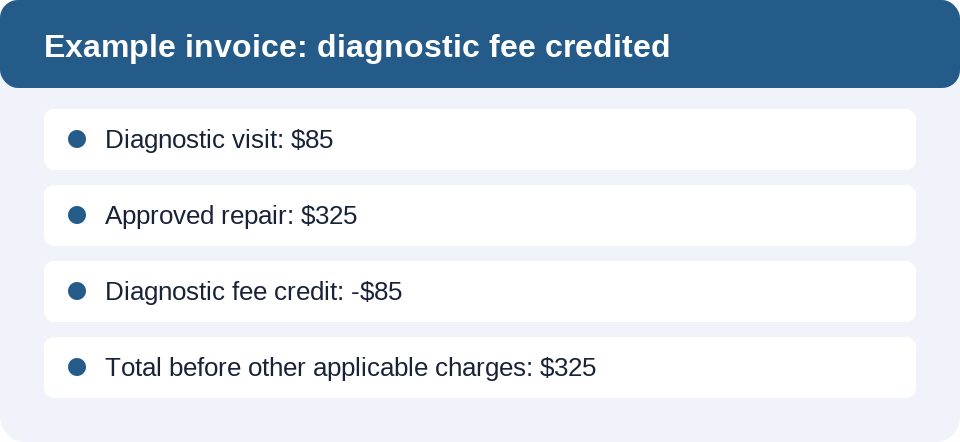
Write separate lines for the visit and the repair
Start with the service address, date, and a short description of the customer's request. Add a line for the diagnostic or service call fee using the wording you gave the customer when they booked. Add confirmed repair work separately, including the parts or labor detail appropriate to your job. When the work has a reference number or follows an estimate, include that reference so the customer can match the paperwork to the job.
Avoid using “service” as the only description. “Diagnostic visit for intermittent equipment shutdown” tells the customer what the first charge covers. “Install owner-approved replacement part and test operation” tells them what the repair charge covers. You can include a concise note about what you checked and any actions you agreed to take next. A customer might forward the invoice to a property owner or office manager, so give them enough context to follow the charges without calling you.
Show the fee credit only if it applies
Suppose the customer approved an $85 diagnostic visit and a repair priced at $325. If you told them the visit fee is credited against the repair, make the calculation visible. The invoice might show an $85 diagnostic line, a $325 repair line, and an $85 credit, for a $325 total before any additional figures that apply. If the $325 repair price was meant to be additional to the diagnostic fee, the same job would have different terms and should be shown accordingly. The numbers are illustrative. Use the pricing policy you actually agreed to with the customer.
What if the customer doesn't approve the repair?
If the customer ends the visit after the diagnosis, list the visit fee and any other authorized work actually completed. Explain the outcome in plain language. For example: “Inspected the unit and discussed replacement options. Repair not authorized at this visit.” If you are preparing a repair quote, send that as its own next step rather than including work the customer hasn't approved as an amount due. Include the accuracy checks and descriptions that your business expects before sending either document.
Keep an estimate and an invoice easy to distinguish
The estimate explains proposed work and the price you can offer. The invoice requests an agreed payment. If the customer receives both on their phone within a few minutes, give them clear headings, dates, and subjects. For an invoice, tell them what to pay and when. For an estimate, tell them what to approve if they want to proceed. When a customer has already paid the diagnostic bill, reconcile the earlier payment against the new bill using your business's normal process.
Check the invoice on a phone before sharing it
Review the PDF or invoice preview on the device you use in the field. Make sure the customer name and site address are correct, money amounts line up, and payment directions are easy to find. If you add a payment link, use an official payment option you have configured for your business and confirm that the request matches the final invoice amount. Keep the invoice reference in the receipt or payment record so you can tell which service call was paid.
If you need to correct an invoice after sending it, tell the customer which version to use. Keep the appropriate earlier records for your business and make the revised balance easy to recognize. A short text can point the person to the correct document, but the document itself should show the current charges, credits, and amount due.
Put the workflow into your next field invoice
Open the Simple Invoice Maker interactive demo to see the invoice layout and test how you'd present the fee. Review the site's payment options if you want to give the customer a way to pay from their phone. Start with your own diagnostic visit wording, create a sample repair and fee credit, and check the preview before you use it on a real job.